Coming soon · SafeHash 3.3 · Windows 11 x64

Every file, exactly as it should be.

SafeHash checks any file, copies camera cards and deliveries with proof that every copy matches, records and verifies ASC MHL histories, and watches your archives for silent corruption. Everything runs offline on your Windows PC.

No account or cloud No key to type No subscription
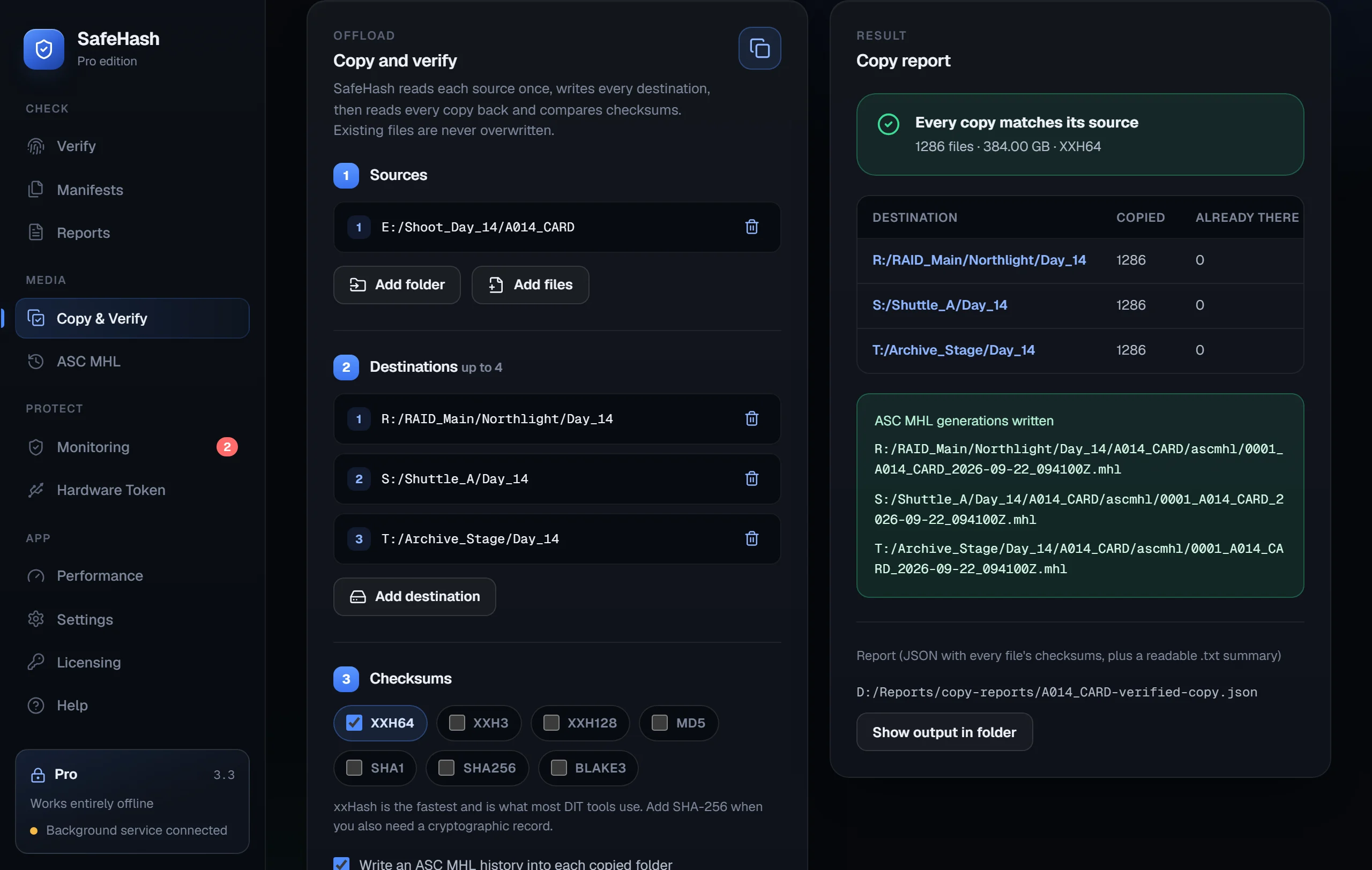
SafeHash Copy & Verify: one camera card copied to three drives, with every copy matching its source and an ASC MHL generation written to each
Entirely localFiles never leave your PC
11 algorithmsSHA-256, BLAKE3, xxHash and more
Pay onceNo renewal, no activation server
5.4 MB downloadFree · paid editions 15.3 MB
How it works

A checksum only helps when you have something to compare it with.

SafeHash gives you that reference. Record files while you know they're good, then check them later and see exactly what changed.

Capture a trusted state

Copy a card with verification, write an ASC MHL generation, save a manifest or accept a monitoring baseline.

Keep the record with the files

Every file, algorithm and checksum is labelled. MHL histories travel inside the card or delivery folder.

Check again, any time

Verify on demand, or let the background service re-check your folders on a schedule.

Know what changed

Modified, missing, new and possibly corrupted files are named, then kept in PDF, JSON or text reports.

Northlight_2026 archive / baseline vs now Illustration · XXH3
FileBaselineNowResult
A014C001_260611_R2KP.ari9f3c1e7a2b04d8569f3c1e7a2b04d856✓ Match
A014C003_260611_R2KP.ari4be20d9c71a3f0654be20d9c71a3e065Possible corruption
NL_R3_v012_ProRes4444.mov71c0a8e3d95f24b60d6e4f19b2a87c35Modified
show_lut.cubee27b5c03a1f98d46—Missing
What's new in SafeHash 3.3

From a single checksum to a verified media workflow.

Real screens from SafeHash 3.3, shown with sample data. Each feature is labelled with the edition it's included from.

New · Pro +

Copy & Verify: offload once, prove every copy.

Copy a camera card, folder or delivery to up to four drives at once. SafeHash reads the source once, writes every destination, then reads each copy back and compares it with the source.

  • Existing files are never overwritten
  • Partial files never appear under their final names; modified times are kept
  • Writes an ASC MHL history into each copy, plus a JSON and text report for every job
  • Also available from the command line: safehash-cli copy
Copy & Verify with one source, three destinations and a copy report showing every copy matches its source
New · Pro +

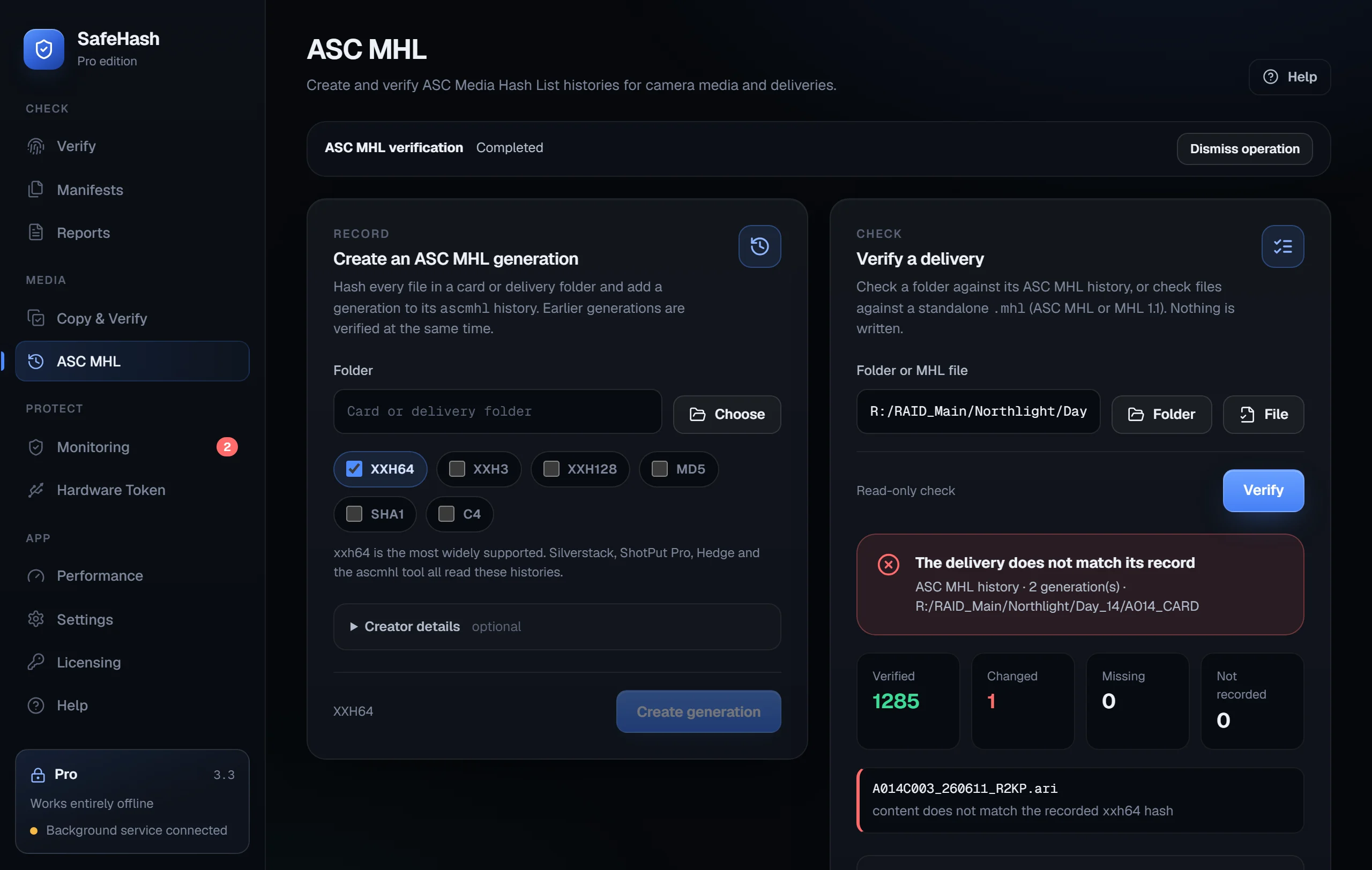
ASC MHL: the record productions already use.

Create and verify ASC MHL v2.0 histories with xxh64, xxh3, xxh128, MD5, SHA-1 or C4. SafeHash writes directory and root hashes, verifies the chain, and works with histories from Silverstack, ShotPut Pro, Hedge and the reference ascmhl tool.

  • Verified, changed, missing and unrecorded files are listed by name
  • Verification is read-only; nothing is written
  • Reads legacy MHL 1.1 files too
ASC MHL verification showing 1285 verified files and one changed camera file
New · Pro +

Catch bit rot before you need the file.

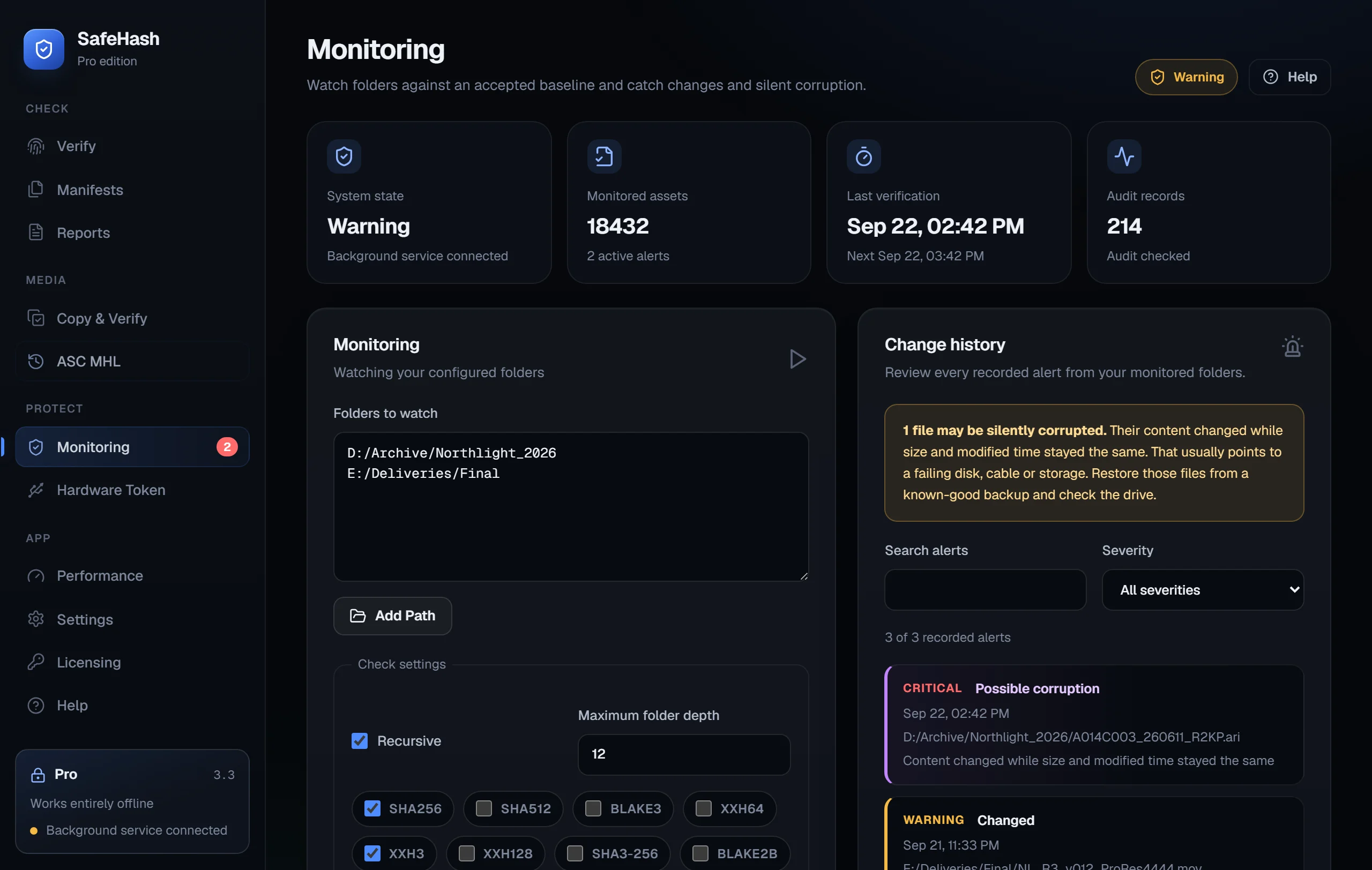
Monitor archives, NAS shares and backup drives against a baseline you approve. The background service starts at install and re-checks on your schedule. When a file's content changes while its size and date stay the same, SafeHash reports Possible corruption, a sign of a failing disk, cable or storage.

  • Changed, new, missing and unreadable files stay flagged until you resolve them
  • Nothing is accepted silently. You approve every baseline
  • "Protected" means a clean check of the folders you chose, and nothing wider
Monitoring screen with two watched folders and a Possible corruption alert in the change history
Free +

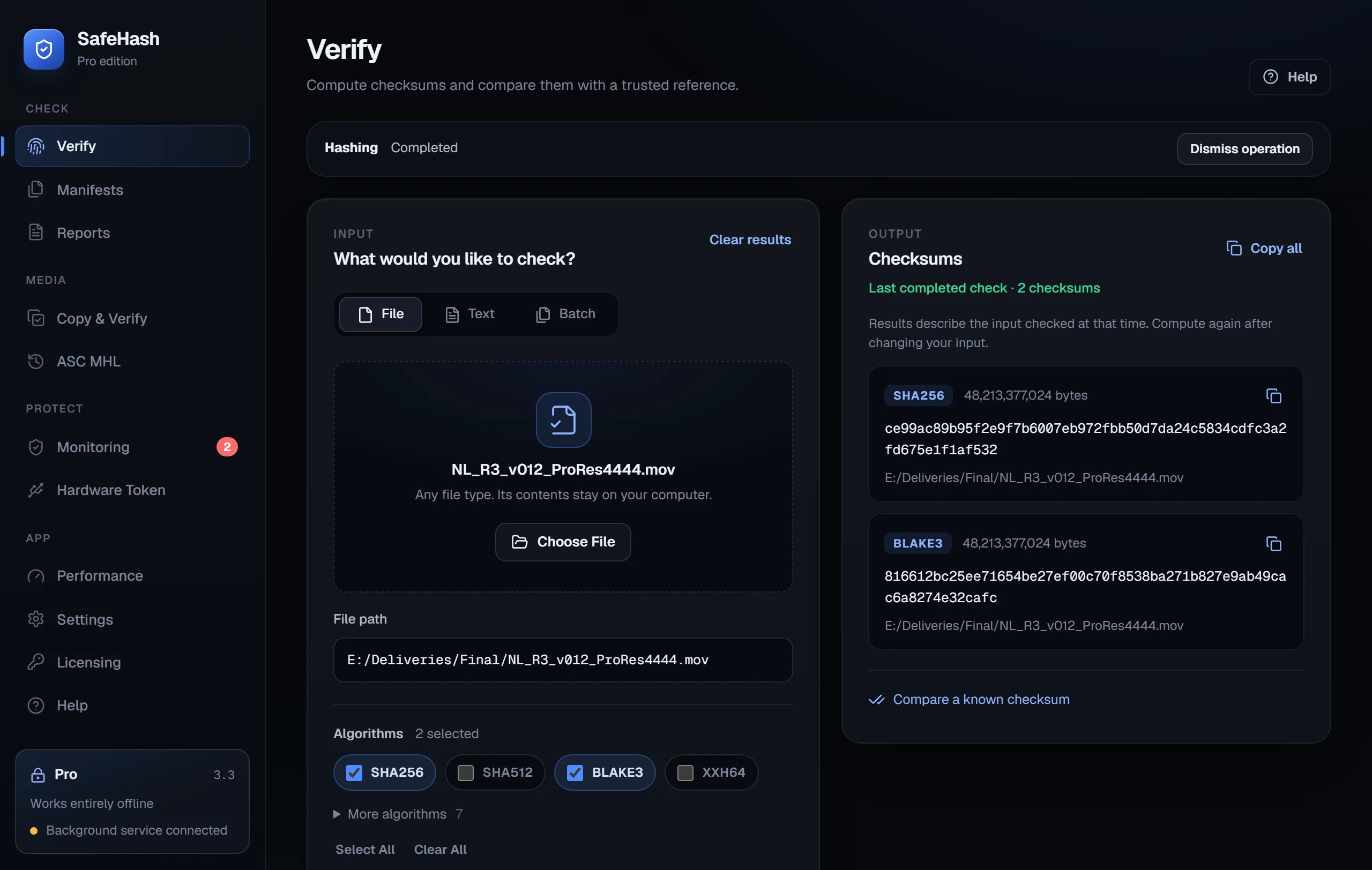
Every checksum you need, in one pass.

Pick a file, paste text or (in Pro) run a batch of folders. Choose several algorithms and SafeHash reads the file once for all of them. Paste a published value to confirm a match.

  • SHA-256, SHA-512, BLAKE3, xxHash (xxh64, xxh3, xxh128), MD5 and SHA-1 in every edition
  • SHA3-256, BLAKE2b and KangarooTwelve in paid editions
  • Right-click Hash with SafeHash in Explorer, folder manifests and batches in Pro
Verify screen with a video file selected and its SHA-256 and BLAKE3 checksums
Pro + · Team +

Turn a check into a record.

Reports re-verify the selected input when you create them, so the record reflects the files at that moment rather than an old on-screen result.

  • PDF and JSON reports with every source and algorithm
  • Evidence ZIP packages you can verify independently (Team)
  • Local records don't establish legal chain of custody or a trusted timestamp
PDF reportReadable record of sources, algorithms and hashes
Pro
JSON reportStructured output for scripts and pipelines
Pro
Evidence ZIPFiles, inventory and records in one verifiable package
Team
Signed audit recordsLocally signed history with verifiable checkpoints
Enterprise
Pro +

Command line

Script hashing, copies, ASC MHL and monitoring with the included safehash-cli.

Team +

Shared profiles

Export monitoring settings so every computer starts from the same configuration.

Enterprise

Policy controls

Lock monitoring configuration inside SafeHash for more controlled workflows.

Every edition

Help built in

Step-by-step guides for every workflow, SmartScreen advice and troubleshooting inside the app.

Every edition

Updates you control

Check for updates reads one public version file when you ask. Nothing updates on its own.

Every edition

Dark interface

A redesigned 3.3 interface with guided screens and clearer results.

Try the idea

Change one character. Watch the fingerprint change.

A checksum is a fingerprint of exact bytes. Edit the text and every changed character of the SHA-256 lights up. SafeHash does the same for whole cards, folders and archives.

SHA-256 · 19 bytes✓ Matches original
866ce84b7dfeb4a571b086a5e85582a47206265cb49c03e1ca69017f33152bc1
Computed in your browser. Nothing is uploaded.
Pricing

Pay once. The license comes with the download.

Each paid edition has its own installer with the license already inside. Install it and you're done: no key, no account, no activation. Each edition includes everything in the one before it. Prices in USD; applicable taxes are shown at checkout.

Free

For checking downloads and single files

$0

any number of computers

  • Text and single-file checks
  • SHA-256, SHA-512, BLAKE3
  • xxh64, xxh3, xxh128, MD5, SHA-1
  • Compare with a published checksum
  • Built-in help and update check
Get notified

Team

For a small studio or department

$149

one-time · 10 computers

  • Everything in Pro
  • Shared monitoring profiles
  • Structured audit export
  • Evidence ZIP packages
Checkout opens soon

Enterprise

For controlled environments

$399

one-time · 25 computers

  • Everything in Team
  • Signed local audit records
  • Monitoring policy controls
  • Hardware-token signing (beta)
Checkout opens soon

Checkout opens soon on Gumroad. Until then, email us and we'll tell you when it's live. Prices shown are launch prices.

Upgrading later is simple.

Buy the higher edition and install it over the one you have. Your settings, baselines, audit records and reports are kept.

How upgrades work
Compare editions
FeatureFreeProTeamEnterprise
Checksums
Text and single-file checks✓✓✓✓
Algorithms8111111
Compare with a known checksum✓✓✓✓
Batches, folders and manifests—✓✓✓
Explorer right-click—✓✓✓
Media
Copy & Verify (up to 4 destinations)—✓✓✓
ASC MHL create and verify—✓✓✓
Monitoring and automation
Background folder monitoring—✓✓✓
Bit-rot (possible corruption) detection—✓✓✓
Scheduled verification—✓✓✓
Command-line tool—✓✓✓
Performance benchmarks—✓✓✓
Records and control
PDF / JSON reports—✓✓✓
Shared monitoring profiles——✓✓
Structured audit export——✓✓
Evidence ZIP packages——✓✓
Signed local audit records———✓
Monitoring policy controls———✓
Hardware-token signing———Beta
License
ComputersAny11025
Download size5.4 MB15.3 MB15.3 MB15.3 MB
One-time price (USD)Free$39$149$399
Before you buy

Clear about what it does, and where it stops.

SafeHash is a focused integrity tool. Here's what to know before you install it. The user guide has the detail.

Built for Windows 11 x64

SafeHash uses the WebView2 runtime that comes with Windows 11. If it has been removed, setup tells you and offers Microsoft's download page. At launch, SafeHash Free lets you check it runs on your computer before you buy.

The installer isn't code-signed

SafeHash is made by an independent developer without a paid Microsoft certificate. Windows may show "Windows protected your PC"; after checking the published checksum, choose More info → Run anyway. Some company-managed PCs block unsigned apps. Never turn off security controls to install it.

Seats work on trust

Your edition's license is inside the download, so nothing phones home to count installs. Install it on as many computers as your edition covers: 1, 10 or 25. Please don't share the paid download.

Checksums detect change, not malware

A match proves the bytes are identical to your reference. xxHash catches accidental corruption, not deliberate tampering; use SHA-256 or BLAKE3 where that matters. SafeHash doesn't scan for viruses or replace backups.

Hardware signing is in beta

Enterprise signing needs a configured compatible certificate and Windows smart-card provider. It's validated with a Windows TPM virtual smart card, not arbitrary USB tokens.

Direct, indie support

Email support@codelliptica.com, Monday to Friday. Refunds within 14 days under the customer terms.

FAQ

Questions, answered.

Something else? support@codelliptica.com

How do I get my license?

It's already in the download. Each paid edition has its own installer that installs the edition's signed offline license beside the app. There's no key to type, no account and no activation server.

Does SafeHash need an internet connection?

No. Installing and using SafeHash work offline. The app goes online only when you choose Check for updates, and then it only reads a public version file. Buying and contacting support happen online, separately from the app.

What can I do with SafeHash Free?

Check text or a single file with SHA-256, SHA-512, BLAKE3, xxh64, xxh3, xxh128, MD5 and SHA-1, and compare the result with a published checksum. It's free to use on any number of computers.

Does it work with my DIT or offload tool?

SafeHash creates and verifies ASC MHL v2.0 histories that match the reference ascmhl tool, and it can verify and extend histories written by Silverstack, ShotPut Pro, Hedge and YoYotta. It also reads legacy MHL 1.1 files.

What is bit-rot detection?

When a monitored file's content changes but its size and modified time stay exactly the same, SafeHash reports Possible corruption instead of an ordinary change. Normal editing always updates the modified time, so this usually points to failing storage. Scheduled checks of archives and backup drives catch it early.

How do I upgrade, for example from Pro to Team?

Buy the higher edition and install it over the one you have. Settings, baselines, audit records and reports are kept.

Will Windows show a warning?

It may. SafeHash isn't Authenticode-signed, so SmartScreen can show "Windows protected your PC" and some managed policies may block it. Check the download against the published checksum, then choose More info → Run anyway. Keep your protections on.

I bought Personal before. Does it still work?

Yes. Personal is no longer sold, but existing Personal licenses keep working in 3.3.

What about refunds?

Refund requests are accepted within 14 days, as set out in the customer terms, without limiting your mandatory rights. There's no enterprise SLA.
SafeHash 3.3 · Coming soon

Launching soon on Gumroad.

SafeHash Free and the paid editions will be available through Gumroad. Leave your email and we'll tell you the day it's live.

To hear when SafeHash launches, email support@codelliptica.com with the subject "SafeHash launch".