Offline Windows file integrity appliance

SafeHash

A premium desktop console, Windows service, and automation CLI for hashing, monitoring, audit trails, reports, and evidence export — without a runtime cloud dependency.

Desktop console, service & CLI Text, file, batch & folder hashing Tamper-evident audit records Offline SHL2 license validation
Contact support

SafeHash — Appliance Dashboard
SafeHash appliance dashboard

Appliance posture

Built for repeatable evidence workflows.

SafeHash combines fast checksum operations with long-running monitoring, explicit audit records, and exportable artifacts for handoff or review.

11
Algorithms including SHA-256, SHA-512, BLAKE3, SHA3, Keccak, and RIPEMD-160.
3
Deliverables: desktop console, Windows service, and automation CLI.
0
Runtime cloud requirement for core verification, licensing, and reporting flows.
SHL2
Offline license format validated locally with public-key verification.

Feature walkthrough

Every workflow has a real product screen.

Screenshots captured from the current SafeHash console for each workflow below.

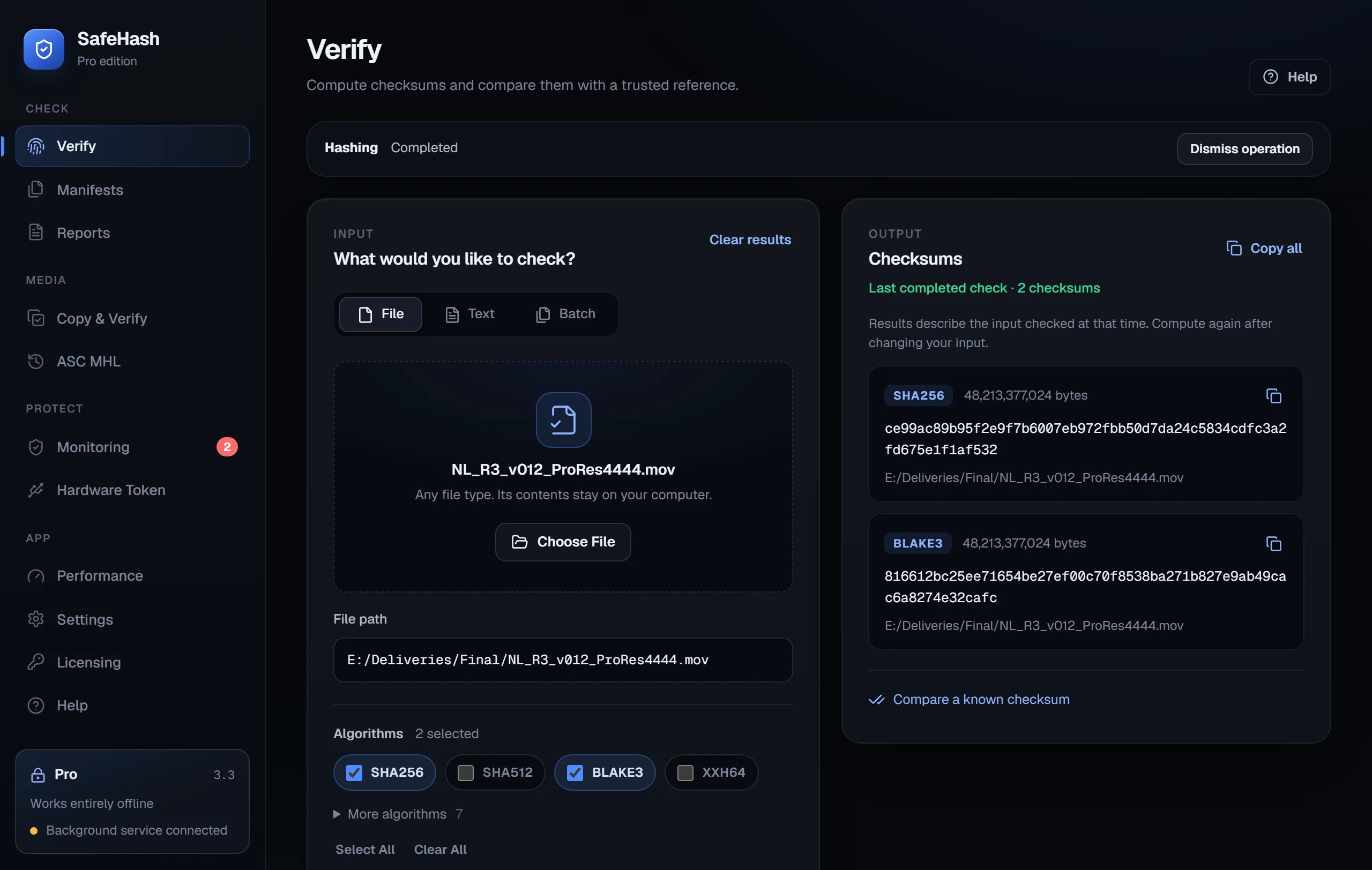
Hashing

Text, file, batch, and folder hashing in one workspace.

Compute hashes with multiple algorithms, process files and folders, and keep the interface focused on evidence output.

  • SHA-256, SHA-512, BLAKE3, SHA3, BLAKE2b, Keccak, RIPEMD-160, and more.
  • Single file, batch file, text, and recursive folder flows.
  • Clear result output for quick copy or report inclusion.
Dashboard and hash workspace
SafeHash dashboard and hashing workspace with algorithm choices and text hashing result.
Hash workspace / text, file, batch, folder
Service-backed folder monitoring
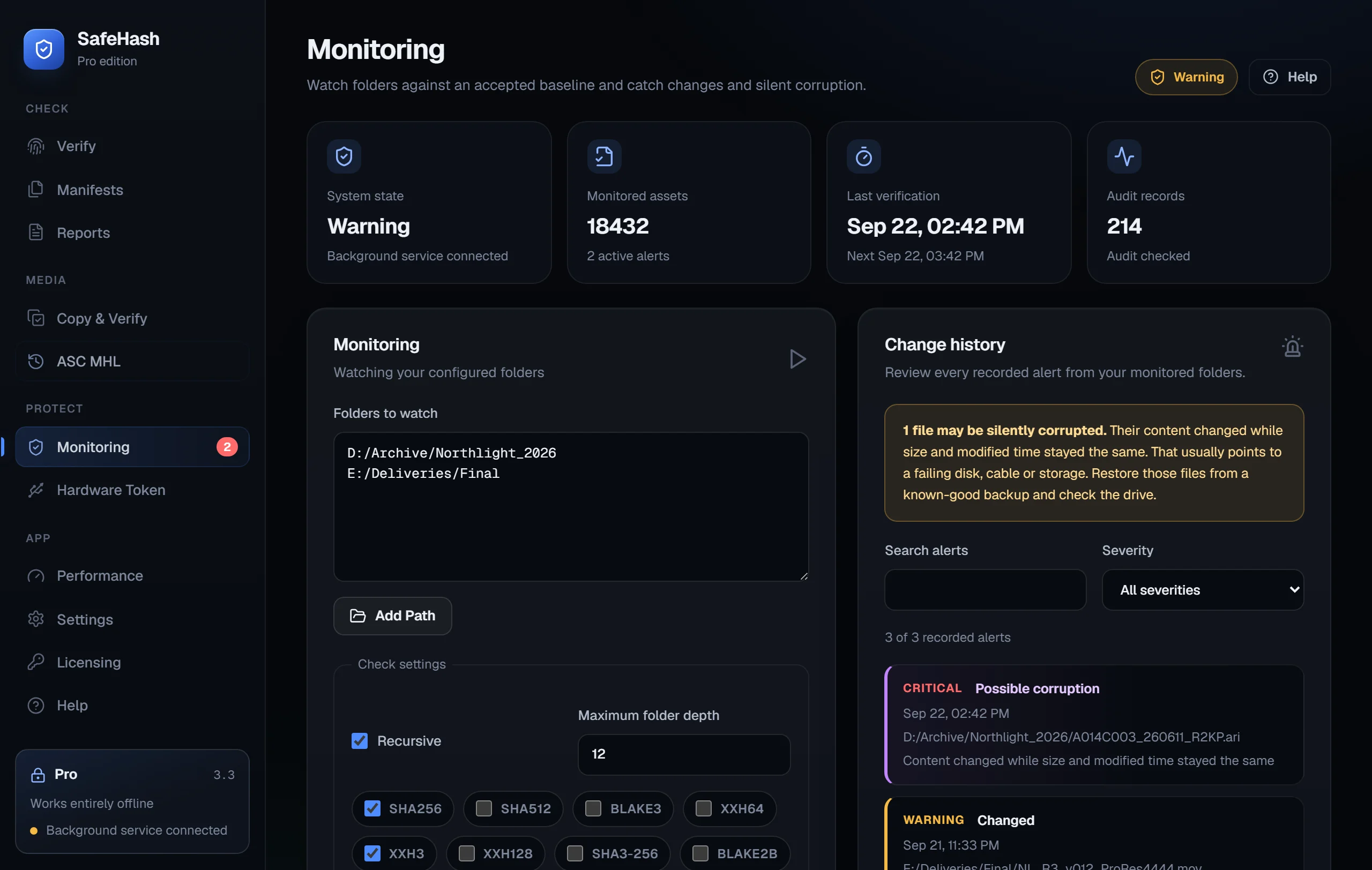
SafeHash monitoring tab showing baseline controls, schedule, and service alerts.
Monitoring / baseline and alerts
Monitoring

Service-backed baseline monitoring for protected folders.

The Windows service keeps monitoring state alive outside the desktop console and records last-known changes after baseline creation.

  • Recursive path monitoring with depth controls.
  • Baseline creation and scheduled verification.
  • Alert history for changed, new, or missing files.
Reports and evidence

Export reports, manifests, signatures, and evidence packages.

Create machine-readable JSON reports, PDF-ready workflow exports, signed manifests, and evidence ZIP packages from the local appliance state.

  • Report output for operator handoff.
  • Manifest generate and verify workflows.
  • Evidence ZIP export for case or project records.
Report and evidence export
SafeHash reports tab with JSON report, evidence ZIP, manifest operations, and hardware signing option.
Reports / manifest and evidence export
Settings and audit export
SafeHash settings tab showing IPC security, audit state, and audit export.
Settings and audit / IPC secured, audit valid
Audit chain

Tamper-evident audit trail for security-relevant actions.

SafeHash records security events into a local audit log so reports can point back to recorded appliance actions.

  • Audit state visible in desktop and CLI diagnostics.
  • Fail-closed audit chain validation in the appliance core.
  • Local JSON audit export, no online collector.
Offline licensing

License validation without internet activation.

SafeHash validates SHL2 license files locally. The upcoming product embeds only public verification material; private signing keys stay outside the product.

  • Pro and Enterprise license tiers.
  • License state visible in desktop, service, and CLI.
  • No activation server required after install.
Offline license import
SafeHash licensing tab showing enterprise license state and import license button.
Licensing / offline SHL2 import
Hardware Token / Smart Card
SafeHash Hardware Token tab showing a TPM virtual smart card certificate and provider details.
Hardware Token / Smart Card / TPM virtual smart card shown
Hardware Token / Smart Card

Validate manifest signing with YubiKey PIV or Windows smart cards.

SafeHash keeps the workflow provider-neutral: direct YubiKey PIV remains supported, and Windows smart-card providers can validate signing flows.

  • Windows smart-card provider and TPM virtual smart card validation path.
  • YubiKey PIV path remains available for real hardware testing.
  • Certificate export beside manifest signatures.
Performance

Benchmark algorithms before large evidence runs.

Run local benchmarks to choose the right algorithm mix before processing protected folders or evidence packages.

  • Quick benchmark from the desktop console.
  • Throughput and algorithm readiness visible at a glance.
  • JSON benchmark output for repeatable comparison.
Local benchmark
SafeHash performance tab showing quick benchmark output and algorithm readiness.
Performance / local benchmark

What buyers get

A complete offline Windows package.

SafeHash is coming as an appliance-style product instead of a single utility window.

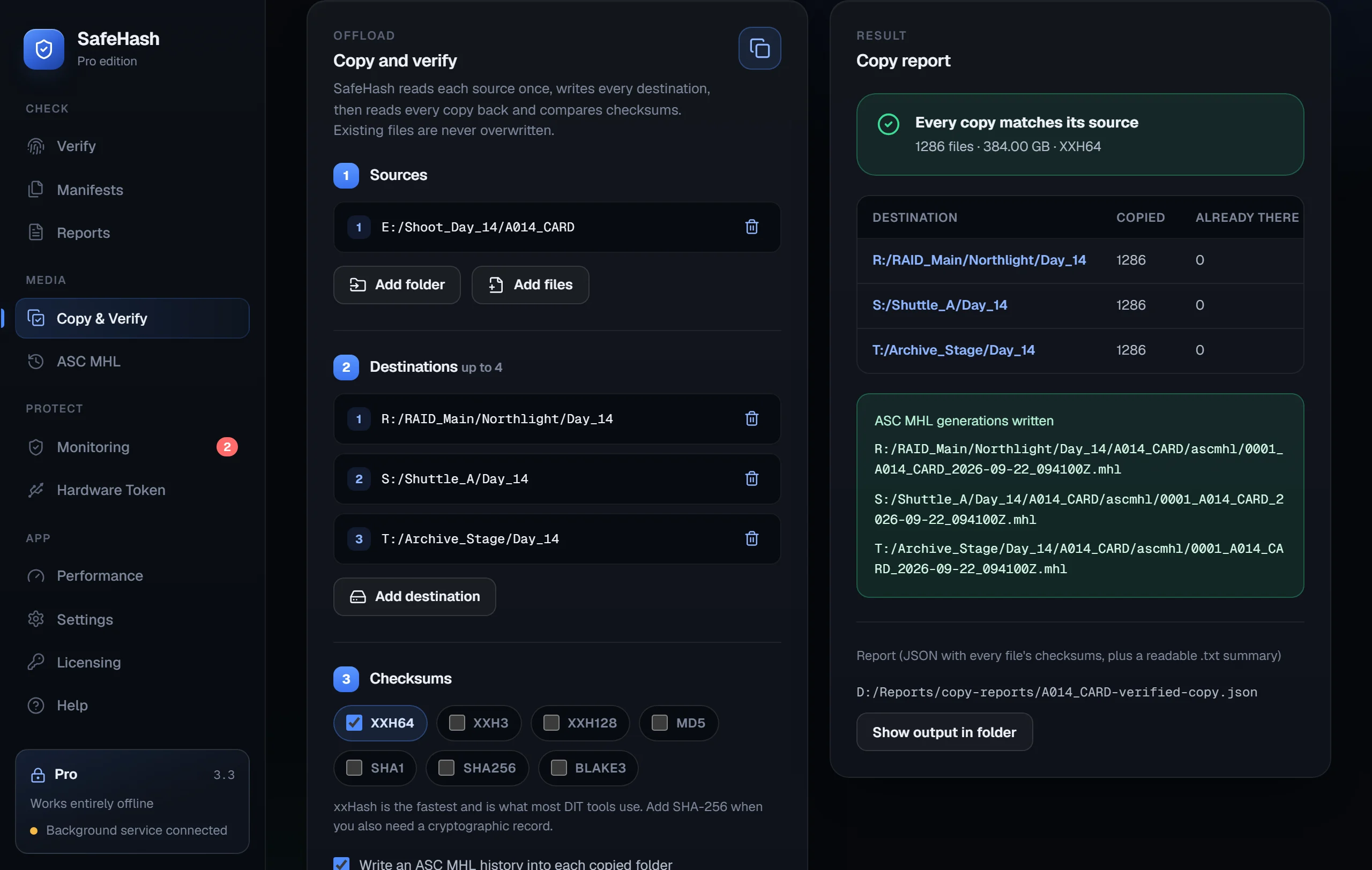
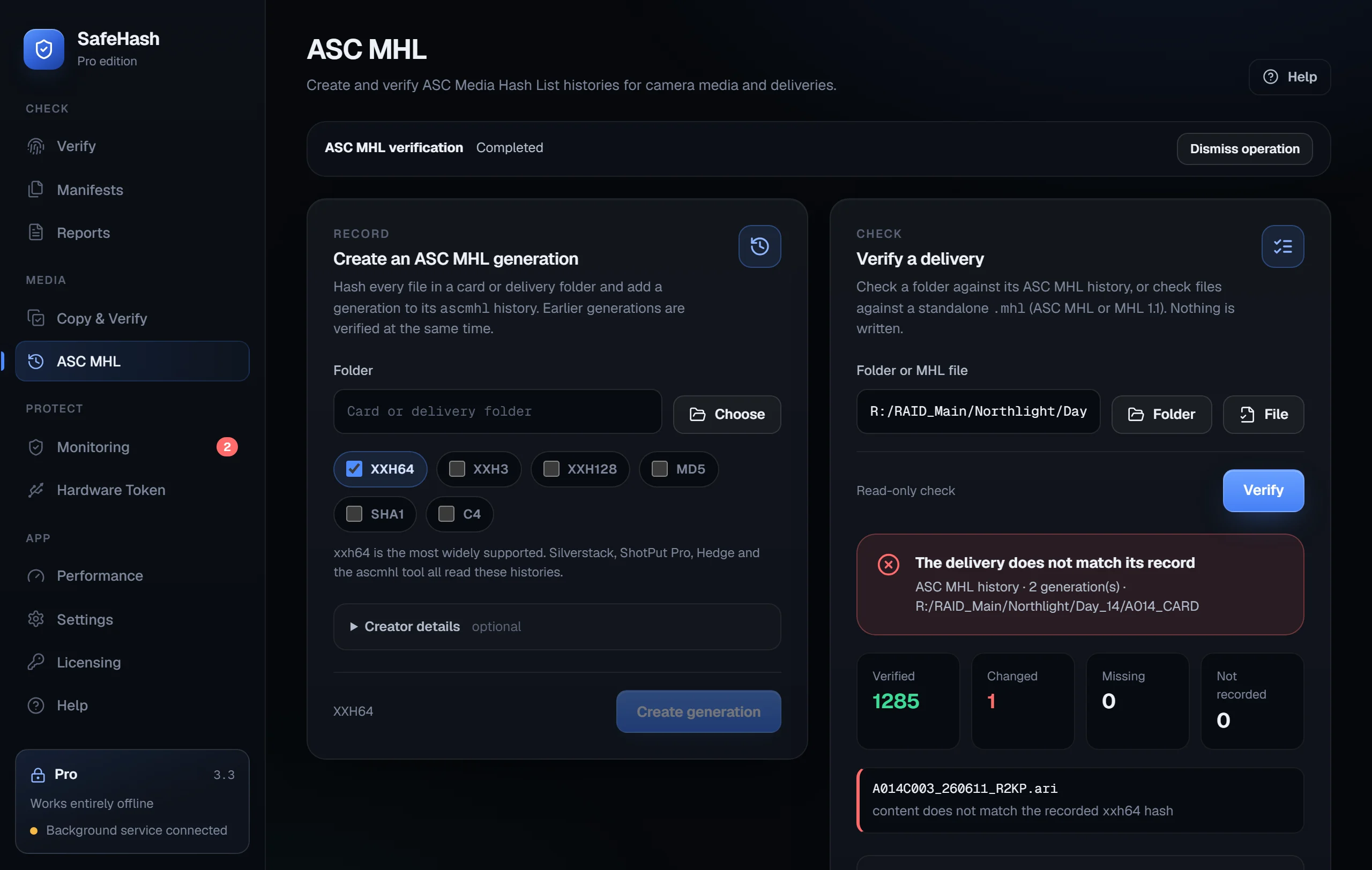
01 / Desktop console

SafeHash desktop app

Wails + WebView2 console for dashboards, hashing, monitoring, reports, licensing, smart-card workflows, performance, and settings.

02 / Windows service

Background monitoring

Service-backed state for monitoring, scheduled verification, alerts, audit events, and appliance health.

03 / Automation CLI

Admin and scripting surface

CLI access for diagnostics, hashing, reporting, licensing status, service checks, and automation workflows.

04 / Offline bundle

Installer and runtime inputs

Bundled WebView2 Fixed Version Runtime, offline license file, report exports, manifests, and evidence ZIP output.

Pricing

Simple paid licenses for offline use.

Pro is for single-seat professional use. Enterprise adds a larger offline seat bundle for teams and deployments.

Pro

SafeHash Pro

$49

1 seat

  • Desktop console, CLI, and service.
  • Offline SHL2 license.
  • Hashing, reports, manifests, audit export, and monitoring.
Enterprise

SafeHash Enterprise

$499

20 seats

  • Enterprise offline seat bundle.
  • Service-backed monitoring and scheduled verification.
  • Evidence export, audit chain, reports, and deployment-friendly CLI.

Requirements

Designed for offline Windows environments.

SafeHash is built for local operation after install, including license checks and evidence generation.

System requirements

Windows 10 or Windows 11. Administrator rights are required for installer, service registration, and Explorer context menu setup.

Offline posture

No activation server, telemetry pipeline, updater check, or online collector is required for core product use after installation.

Runtime bundle

The installer includes the WebView2 Fixed Version Runtime so the desktop console does not require a first-run web runtime fetch.

Optional signing hardware

YubiKey PIV and Windows Smart Card providers are for manifest signing workflows; hashing, monitoring, licensing, and reporting do not require a hardware token.

Installer signing: until a code-signing certificate is added, Windows can show an Unknown Publisher warning for downloaded installers.

FAQ

Feature and trust questions.

Short answers for buyers evaluating SafeHash for local Windows integrity workflows.

Does SafeHash require internet access?

No. Core workflows run locally after install, including license validation, hashing, monitoring, reports, audit export, and evidence ZIP output.

What does the Windows service do?

The service owns background monitoring, scheduled verification, health state, audit events, and local IPC for the desktop and CLI.

Is there a CLI?

Yes. SafeHash includes an automation CLI for diagnostics, scripting, service checks, report operations, and admin workflows.

What reports can it create?

SafeHash supports machine-readable report output, PDF-ready workflows, manifests, signatures, audit export, and evidence ZIP packages.

How is audit integrity handled?

Security-relevant actions are written to a local tamper-evident audit chain, and corrupt chains are treated as invalid instead of silently trusted.

How does offline licensing work?

SHL2 license files are verified locally with public-key validation. No cloud activation server is needed for normal licensed use.

Is a YubiKey required?

No. Hardware Token / Smart Card support is for manifest signing workflows. Normal hashing, monitoring, licensing, reports, and audit features do not require a token.

Who supports it?

Codelliptica supports SafeHash directly at support@codelliptica.com for setup, licensing, deployment notes, and product questions.

Get SafeHash

Offline file integrity for Windows operators.

Use SafeHash when you need repeatable hashes, service-backed monitoring, audit records, and exportable evidence artifacts in a local Windows environment.

support@codelliptica.com